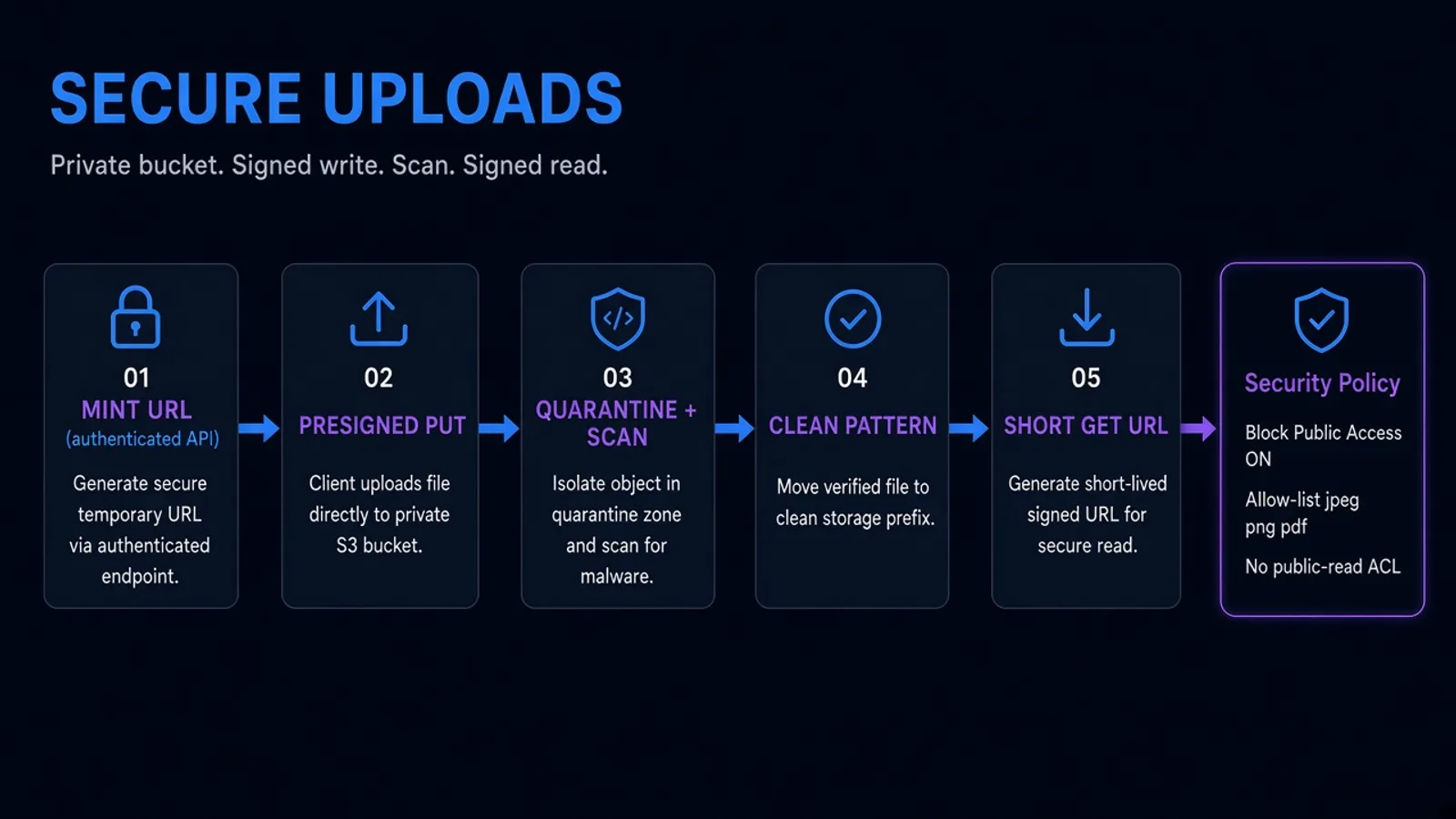
A public S3 bucket with GetObject for the world is not a product feature. It is an incident waiting for a crawler. Secure file uploads mean the browser never gets a long-lived key, the object never stays world-readable, and what you stored is what you thought you stored.
This is the path we use on cloud and product work. It pairs with stop committing secrets (the key never ships to the client) and a boring AWS baseline (private subnets, alarms, one bucket naming scheme).
Private Bucket, Signed Everything
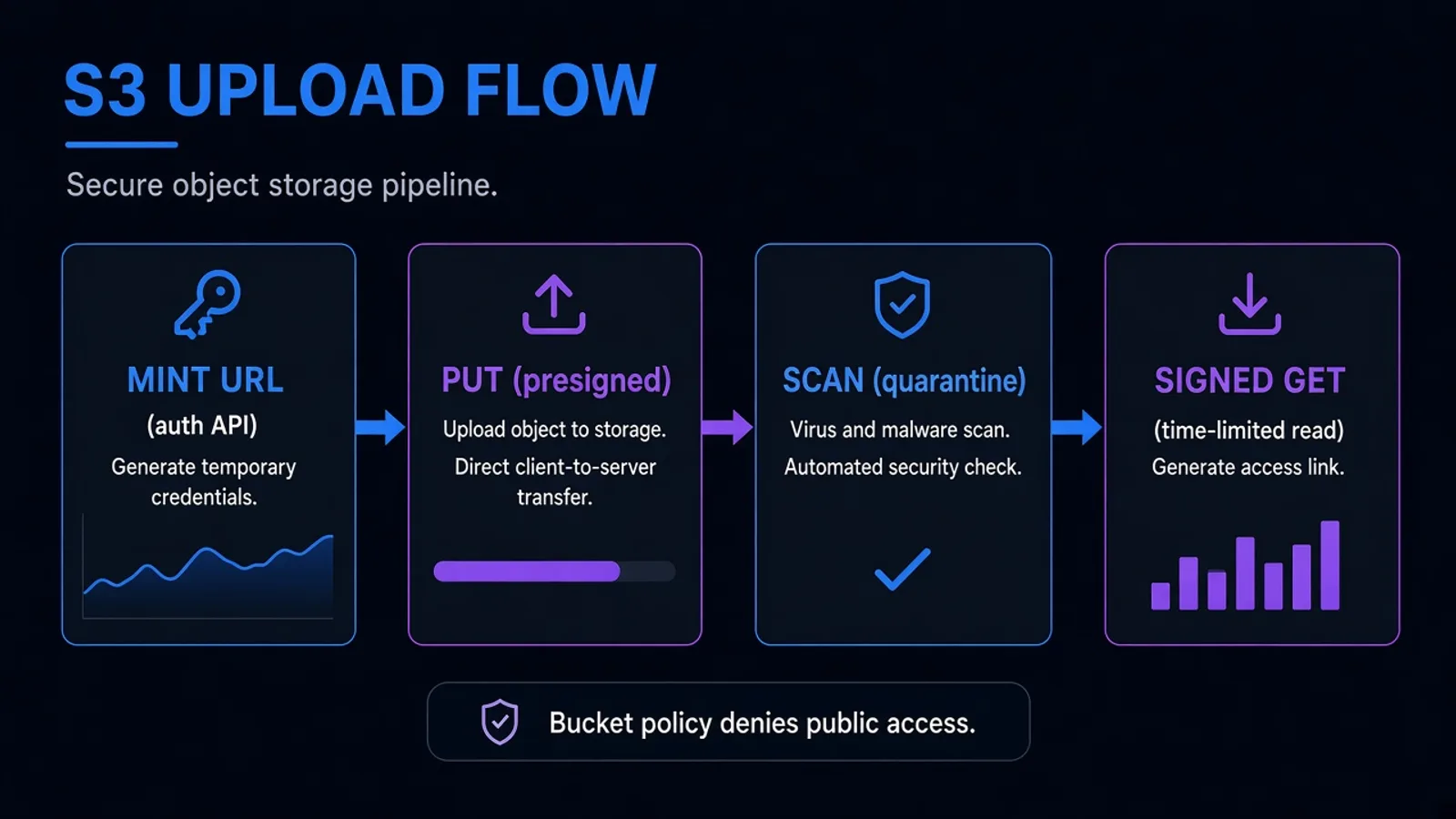
Defaults:
- Block Public Access on the bucket (all four settings)
- Encryption at rest (SSE-S3 or KMS if you already have a key policy)
- Versioning on if deletes would hurt; lifecycle rules so incomplete uploads die
- Access via presigned URLs or CloudFront with signed cookies - not
public-readACLs
The API that mints the URL is authenticated like the rest of the product (JWT / session rules still apply). The URL includes:
- Key prefix the user is allowed to write (
uploads/${tenantId}/${userId}/...) - Content-Type the server allowed, not whatever the browser claimed
- Max size (
content-length-rangein a POST policy, or a checkedContent-Lengthon PUT) - Expiry measured in minutes, not days
Do not mint a URL for ../ or a key outside the tenant prefix. Treat the key as an authorization decision.
Content Types and Size Are Product Rules
"Allow all" is how you store HTML that gets served as a user profile and turns into XSS, or a 5GB "avatar."
Allow-list by purpose:
| Purpose | Allow | Max size (start here) |
|---|---|---|
| Avatar | jpeg, png, webp | 2-5 MB |
| Document | pdf, and maybe docx if you must | 10-25 MB |
| Video | a transcode pipeline, not raw dump to the bucket | defined by the encoder |
Sniff magic bytes after the upload, on a worker, before the object is readable by other users. Content-Type on the wire is a claim.
Serve downloads as Content-Disposition: attachment unless you have a dedicated, locked-down preview origin. Never serve user HTML from your cookie domain.
Scan Before Anyone Else Reads It
Presigned PUT lands in a quarantine prefix or a holding bucket. A worker (Lambda, ECS task, or queue consumer) runs:
- Size and magic-byte check
- Malware scan (ClamAV, a vendor API, or your cloud's native scanner)
- Optional: image re-encode so the bytes you store are not the bytes they sent (strips weird payloads)
Only then copy or move to the clean prefix and write the metadata in Postgres. The app never points users at quarantine.
If you skip the scan because "it is only internal," you will paste a link in Slack. Internal is still a distribution channel.
What Not to Do
- Access keys in the mobile app or a public git repo
PutObjectwithACL: public-read- Using the same bucket for logs, Terraform state, and user avatars
- Infinite-expiry signed URLs in emails
- Trusting the filename extension
- Turning the bucket into a static host for untrusted HTML
Website hosting on S3 is fine for your compiled assets with a tight origin. It is not a user-upload product.
Observability and Cost
Log tenant_id, key prefix, bytes, and who minted the URL. Alert on a sudden spike in PUT count - that is a loop or an abused token, the same class of problem as rate limits.
Incomplete multipart uploads linger on the bill. A lifecycle rule for abort incomplete after a day is not optional.
FAQ
Can the client upload straight to S3? Yes, that is what presigned URLs are for. The authorization still lives in your API. Direct-to-S3 without your signature is just a public inbox.
Is CloudFront required? No for an MVP with low traffic. Yes when you need a custom domain, TLS you control, geo caching, or to keep the bucket fully private with origin access.
What about Azure Blob or GCS? Same shape: private store, short-lived write token, scan, short-lived read. The brand of object storage is not the security model.
The Bottom Line
Secure file uploads to S3 are a private bucket, a short signed write, a scan, and a short signed read. Public ACLs are not a shortcut. They are the incident.
Put the allow-list and the prefix rule in the SOW. Then the "upload feature" is software, not a bucket with hope.
Need uploads designed as part of the build, not bolted on in week eight? See cloud and DevOps or get a free estimate.