
Every business wants an AI chatbot in 2026. Few want the support tickets that come from a bot that invents refund policies, leaks the wrong customer data, or stalls on anything not in its training cut-off.
An OpenAI-powered chatbot for business can reduce support load, qualify leads, and speed up internal knowledge work - if you treat it as a product with boundaries, not a magic widget.
This post covers use cases that pay off, architecture that stays safe, realistic cost bands, and how to ship without embarrassing hallucinations.
What "Chatbot for Business" Usually Means
People use one phrase for three different products:
- Website assistant - answers FAQs, books demos, routes to humans
- Internal knowledge bot - searches policies, runbooks, Notion/Confluence, tickets
- Workflow agent - takes actions (create ticket, update CRM, draft email) with approval gates
Start with (1) or (2). Jumping straight to unsupervised (3) is how brands end up in screenshots on LinkedIn for the wrong reasons.
When an OpenAI Chatbot Is Worth It
Strong fits
- High volume of repetitive questions with answers in docs
- After-hours lead capture with structured qualification
- Internal onboarding ("How do we expense X?")
- Drafting first responses that a human reviews
Weak fits (for now)
- High-stakes legal/medical advice without a human in the loop
- Anything requiring guaranteed real-time inventory without a system of record
- "Replace the entire support team in week one"
AI works best as leverage on existing process, not as a replacement for unclear process.
The Architecture That Actually Works
A production business chatbot is rarely "call the Chat Completions API with a system prompt."
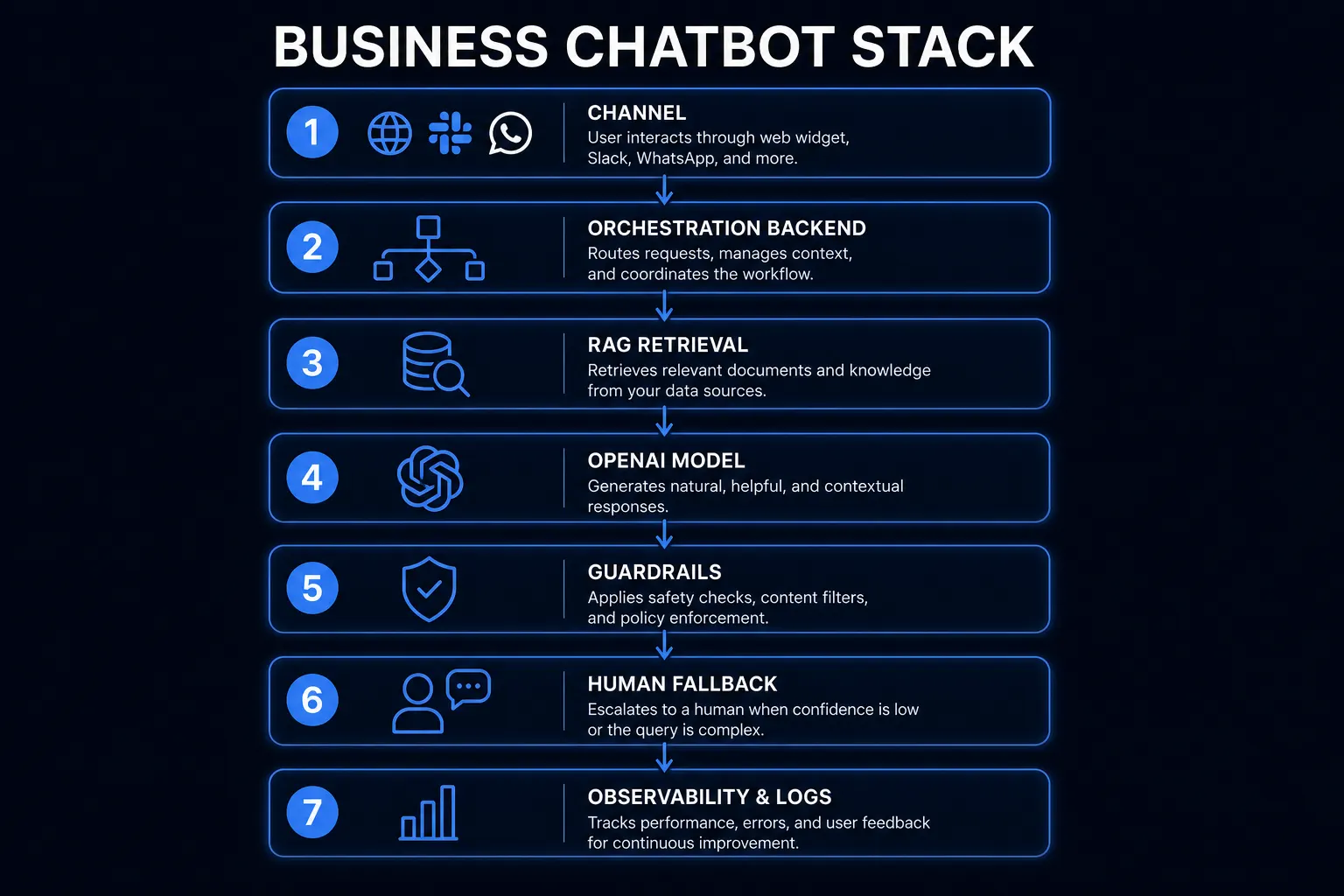
Typical reliable stack:
- Channel - website widget, Slack, WhatsApp, or helpdesk plugin
- Orchestration - your backend (Node, Python, etc.) owns prompts, tools, and logging
- Retrieval (RAG) - chunked docs in a vector store; retrieve relevant passages per question
- Model - OpenAI (or Azure OpenAI) for generation; choose model tier by latency/cost
- Guardrails - topic allowlists, PII filters, refusal rules, citation requirements
- Human fallback - clear handoff to email/chat/agent with transcript
- Observability - log prompts, retrieved chunks, answers, thumbs-down events
Without retrieval grounded in your content, the model will sound confident while being wrong. Without logging, you cannot improve it.
Cost: Build + Run (2026 Ballpark)
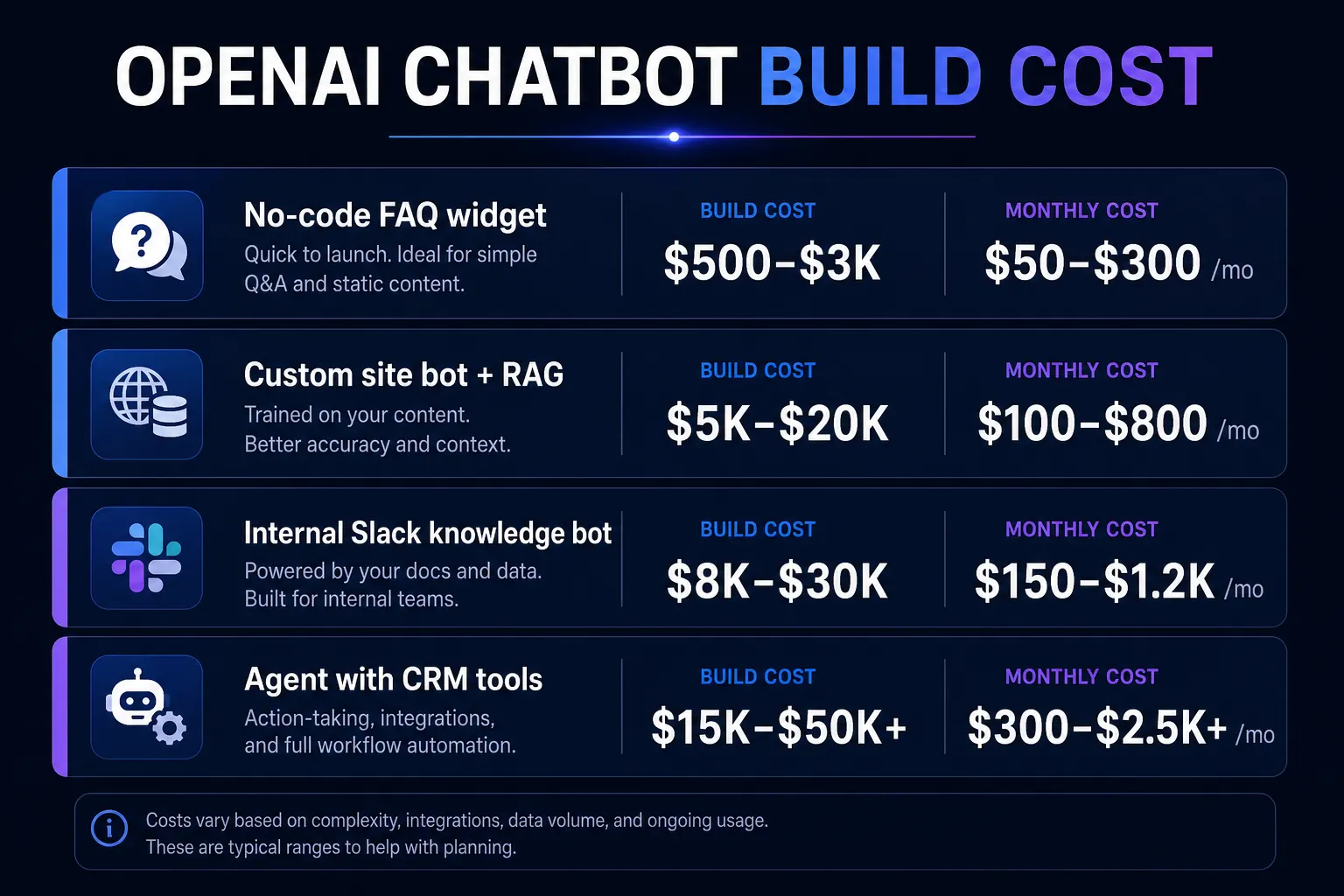
| Approach | Build cost | Monthly run (small-mid) |
|---|---|---|
| No-code widget on FAQ only | $500 - $3,000 | $50 - $300 |
| Custom site bot + RAG on docs | $5,000 - $20,000 | $100 - $800 |
| Internal Slack/Teams knowledge bot | $8,000 - $30,000 | $150 - $1,200 |
| Agent with CRM/ticket tools + approvals | $15,000 - $50,000+ | $300 - $2,500+ |
Usage costs scale with tokens (questions × context size × model). A chatty bot with huge context windows can surprise you - design retrieval to stay lean.
For how AI features sit inside broader budgets, see custom software development costs in 2026 and MVP cost in India.
Data and Security Basics (Non-Negotiable)
- Do not paste secrets into prompts. API keys stay in the server.
- Permission-aware retrieval. An employee bot must not return HR files to every staff member.
- Vendor posture. Decide OpenAI API vs Azure OpenAI based on compliance, data residency, and enterprise agreements.
- Retention. Define how long transcripts are stored and who can see them.
- Eval set. Keep 30-50 real questions with expected answers; regression-test after every prompt or doc change.
If you handle regulated data, treat the chatbot as part of your compliance surface - same as any other customer-data system.
Prompting Alone Will Not Save You
A clever system prompt helps tone and refusals. It does not invent accurate company policy that was never uploaded.
Invest in:
- Clean source docs (outdated PDFs poison RAG)
- Chunking strategy that preserves headings and tables
- Answers that cite sources ("Based on Refund Policy §3...")
- Explicit "I don't know - here's how to reach support" behavior
Users trust bots that admit uncertainty more than bots that improvise.
A Sensible 4-6 Week Delivery Plan
Week 1 - Discovery Channels, success metrics (deflection rate, CSAT, lead form completion), must-refuse topics, content inventory.
Week 2 - Foundations Ingest docs, build retrieval, basic chat API, admin way to re-index content.
Week 3 - Product UI Widget or Slack app, conversation memory rules, handoff, branding.
Week 4 - Guardrails + eval Red-team prompts, PII checks, eval harness, staging with real staff.
Week 5-6 - Soft launch One page or one internal team first; measure failures; expand.
This is the same scoped discipline as any MVP - not a weekend hackathon dressed as a product.
Metrics That Matter
- Answered without human (deflection) - only count correct answers
- Thumbs-down / escalation rate
- Time-to-first-response
- Lead quality if used for sales
- Cost per conversation
Vanity metric: total messages sent. Useful metric: problems solved without creating new ones.
Build vs Buy
Buy when your content is simple FAQs and you need something live this week.
Build when you need custom workflows, private data with permissions, brand-specific UX, or tight integration with your product.
Many teams do both: a vendor widget for marketing site FAQs, and a custom RAG assistant for authenticated product or internal use.
The Bottom Line
An OpenAI chatbot for business pays off when it is grounded in your knowledge, constrained by clear policies, measured against real questions, and designed with a human escape hatch. The model is the easy part. The product around it is the work.
Want a production chatbot - not a demo? See production AI or contact us for a free estimate.